Assistive Access provides simplified versions of core iPhone apps for users with cognitive disabilities, autism spectrum disorder, or other conditions requiring reduced cognitive load.
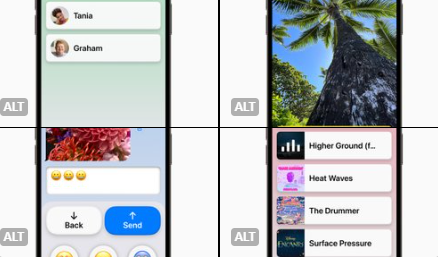 The feature strips apps to essential functions: larger buttons, high-contrast visuals, simplified navigation patterns, and limited choices per screen. Messages offers keyboard-only or emoji-only communication modes. Photos displays grid or list views with basic editing only. Calls shows favorites with large contact photos.
Customizable by caregivers or trusted support persons through Settings. Can restrict app access, set communication contacts, and choose visual layouts. Requires iOS 17 or later.
Designed for users who find standard iOS interfaces overwhelming or confusing. Reduces distractions while maintaining core functionality.
The feature strips apps to essential functions: larger buttons, high-contrast visuals, simplified navigation patterns, and limited choices per screen. Messages offers keyboard-only or emoji-only communication modes. Photos displays grid or list views with basic editing only. Calls shows favorites with large contact photos.
Customizable by caregivers or trusted support persons through Settings. Can restrict app access, set communication contacts, and choose visual layouts. Requires iOS 17 or later.
Designed for users who find standard iOS interfaces overwhelming or confusing. Reduces distractions while maintaining core functionality.