Assistive Access provides two distinct interface layouts for users with cognitive disabilities, autism, or learning differences who benefit from reduced visual complexity.
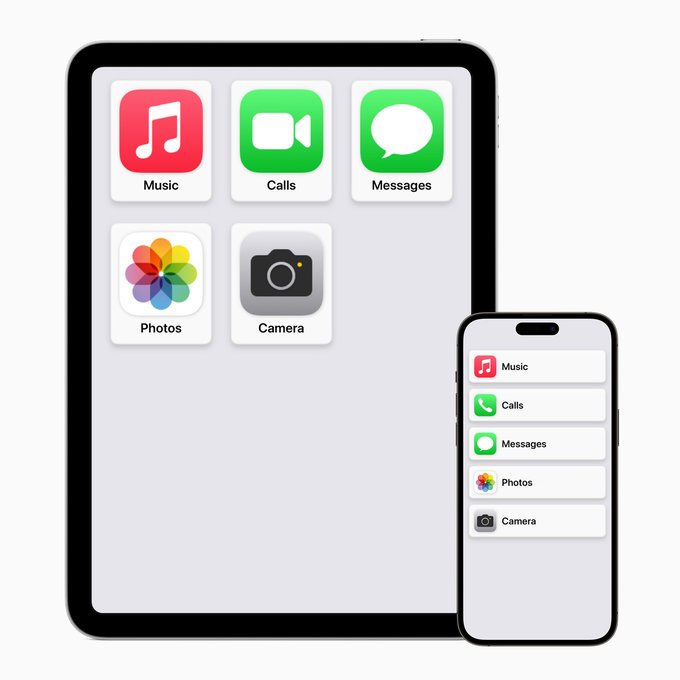 Grid layout: Large square buttons with app icons and minimal text. Ideal for visual learners and users who navigate better with images. Fixed icon positions reduce confusion from layout changes.
Row layout: List-based interface with prominent text labels and smaller icons. Better for users who prefer text-based navigation or have difficulty processing visual information.
Both layouts maintain consistent positioning across sessions. Apps appear in the same location every time, eliminating the cognitive load of searching for frequently used functions.
Caregivers or support persons configure layout choice during Assistive Access setup in Settings > Accessibility. Cannot be changed by the primary user without passcode. Layout selection persists across all supported apps (Phone, Messages, Camera, Photos, Music).
Requires iOS 17 or later. Available on iPhone XS and newer models.
Grid layout: Large square buttons with app icons and minimal text. Ideal for visual learners and users who navigate better with images. Fixed icon positions reduce confusion from layout changes.
Row layout: List-based interface with prominent text labels and smaller icons. Better for users who prefer text-based navigation or have difficulty processing visual information.
Both layouts maintain consistent positioning across sessions. Apps appear in the same location every time, eliminating the cognitive load of searching for frequently used functions.
Caregivers or support persons configure layout choice during Assistive Access setup in Settings > Accessibility. Cannot be changed by the primary user without passcode. Layout selection persists across all supported apps (Phone, Messages, Camera, Photos, Music).
Requires iOS 17 or later. Available on iPhone XS and newer models.
Assistive Access Layout Options: Grid vs Row Interface for Cognitive Accessibility
NEXT TIP
iPhone Assistive Access: Simplified Interface for Cognitive Disabilities
Assistive Access simplifies iPhone apps for users with cognitive disabilities, offering streamlined versions of Camera, Photos, Music, Calls, and Messages with reduced visual complexity and focused workflows.
TIP FROM
5 iPhone Accessibility Features: Assistive Access and Live Speech
New iPhone accessibility features including Assistive Access, Personal Voice, Live Speech, and Point and Speak